
Timer Function - How to program the machine to get to standby automatically
The machine has 4 timers that put it into sleep mode for a set period every day. The timers repeat every 24 hours. Weekly or monthly schedules are not available.
What you need
Access to the service keypad on the machine
No USB cable connected to the machine
The time the machine should go to sleep and the time it should wake up

Steps
Note: While a USB cable is connected to the machine, programming from the keypad is locked and the display shows USB LOCK. Remove the cable before you start.
Open the timer settings
Press ↑ until the display shows Adjust.
Press YES.
Press ↑ or ↓ until the display shows the timer menu. [Image: timer-sleep-01.png – display showing the timer menu]
Press YES. The display shows the OFF time of timer 1, with the minutes blinking.
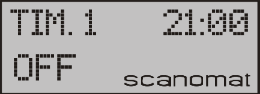
Set a timer
Warning: If you use more than one timer, make sure the periods do not overlap.
Press ↑ or ↓ to set the OFF time. This is when the machine goes to sleep.
Press YES to confirm.
Set the ON time the same way. This is when the machine wakes up.
Set the timer to activated with ↑, ↓ and YES.
Press NO to leave the timer settings. You do not need to go through the other timers.
Note: For example, to put the machine to sleep from 23:00 to 06:00, set timer 1 to OFF 23:00 and ON 06:00, and set it to activated.
What to expect
At the OFF time, the machine goes into sleep mode. The heaters turn off and only the electronics stay on. The display light goes out and only the Scanomat logo stays lit.
At the ON time, the machine wakes up and heats up.
If Automatic start up is set on the machine, pressing a drink key during sleep wakes the machine. It heats up and then dispenses the drink. Machines operated from the app wake up when a drink is ordered.
Turn the machine off by hand
Hold ON/OFF for 2 seconds: the machine goes into sleep mode. The internal clock keeps running, so use this way if you use the timers.
Mechanical power switch in the dispensing area: this turns the power off completely. The internal clock stops, so the timers do not work.
To turn the machine on again, press ON/OFF. If Automatic start up is set, you can also press a drink key.
Power consumption
State | Compact | Pro |
|---|---|---|
Standby, ready with heaters at temperature | 37.4 W | 39.6 W |
Brewing | 2,035 W | 2,332 W |
Sleep, after ON/OFF or during a timer period | About 7 W | About 7 W |
Figures are measured at 220 V.
If it does not work
The display shows USB LOCK: remove the USB cable from the machine and start again.
The machine does not go to sleep at the OFF time: check that the timer is set to activated and that no two timers overlap.
The timers stopped working after the machine was off: the mechanical power switch was used and the internal clock stopped. Use ON/OFF to turn the machine off instead.
The Adjust menu stays locked: the adjust lock is set in the machine setup. It can only be unlocked with the Barista Program. Contact Scanomat support.